You can update source codesets and target codesets in the Codeset Mapping Grid.
To update source codesets, follow these steps:
- Go to Application Menu > Data Catalog > Codeset Manager > Codeset Mappings.
- In the Code Mappings Workspace pane, expand a category and click a codemap.
- In CSM Mapping Overview pane, click
 .
. - Select a new Source Codeset and Source System/Environment.
- Select a Target Codeset and Target System/Environment.
- Click
 .
.
The Codeset Mapping Grid and CSMMapSpec Overview pane appears.
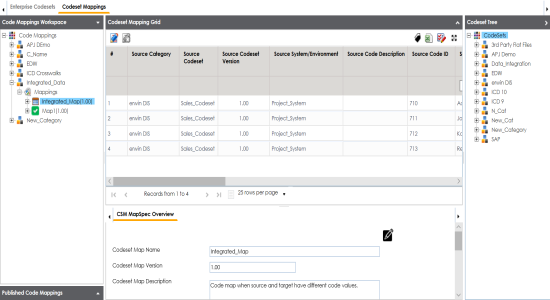
You can update Codeset Map Name and Codeset Map Description.
You cannot edit Codeset Map Version.
The Codeset Mapping Grid is updated with the new source codeset. But, the target codeset doesn't update in the Codeset Mapping Grid. You need to drag and drop target codeset from the Codeset Tree to Codeset Mapping Grid.
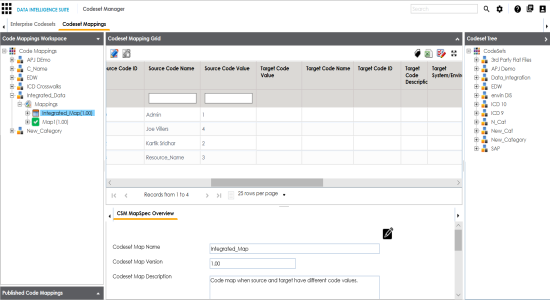
To update target codeset in the Codeset Mapping Grid, follow these steps:
- In the Codeset Mapping Grid, click
 .
. - In the Codeset Tree, expand the target category and the Codesets node.
- Drag and drop the target codeset into the Code Set Mapping Grid under the Target Code Value column.
- Click
 .
.
The Codeset is locked and other users cannot make changes.
The target codeset is updated in the Codeset Mapping Grid.
To update target code values in the Codeset Mapping Grid, follow these steps:
- In the Codeset Mapping Grid, click .
- Double-click a cell under the Target Code Value column and update it with the one of the options available.
- Click .
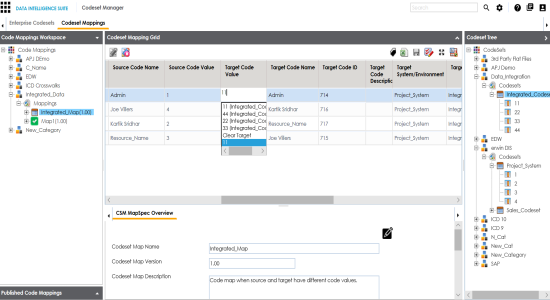
The target code values are updated.